
Bundled Shifts let you group up to a week of Shifts together so one Worker can get hired for the entire run at once, instead of you re-posting, re-reviewing, and re-hiring for the same role every single day.
Bundle rules:
- 2–7 Shifts per bundle.
- All Shifts must share the same Position and Location.
- 40 scheduled hours max per Monday–Sunday week.
- Post your bundle at least 1 day before the first Shift starts.
- Smart Hire must be on.
- Bundled Shifts are offered to Flex Workers only. This feature does not apply to Staff Workers.
Creating a bundle:
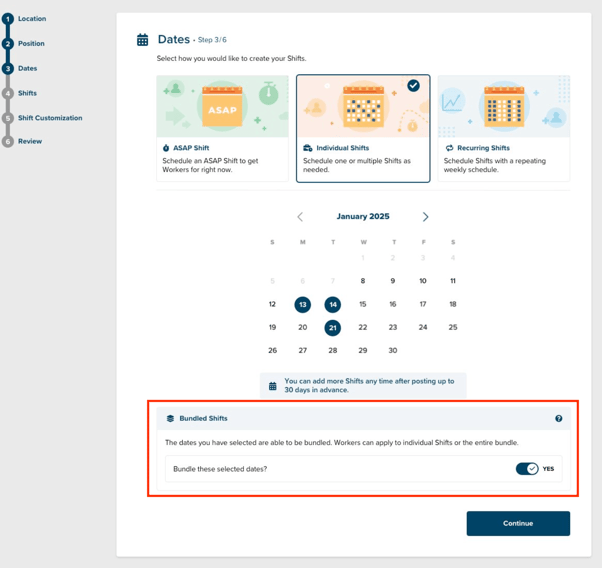
- Start creating a new Shift and choose "Individual Shifts" on the Dates step.
- Select 2 or more dates on the calendar. A "Bundled Shifts" section will appear below the calendar.
- Turn on "Bundle these selected dates?" Workers will now bid on the entire bundle instead of Shift by Shift.
- Finish setting your times, review your Shifts, and post like normal.
Once you post a bundle, you can't add more Shifts to it, but you can still edit or cancel individual Shifts inside it if your plans change.
Managing your bundles:
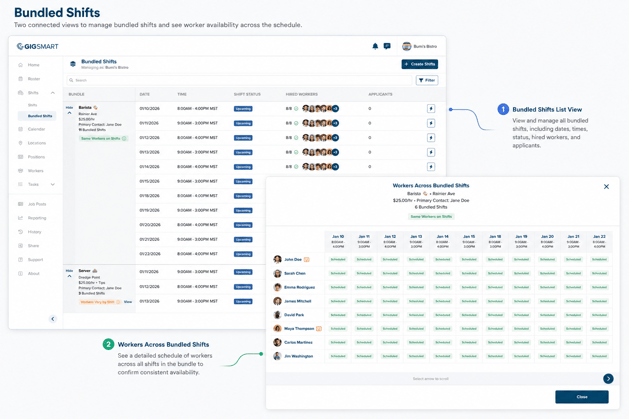
Find every bundle you've posted under Shifts > Bundled Shifts in the left-hand navigation. Each bundle shows its dates, times, status, and how many Workers are hired at a glance. Click into a bundle to see exactly which Worker is scheduled on which day.
Reviewing bids and sending offers:
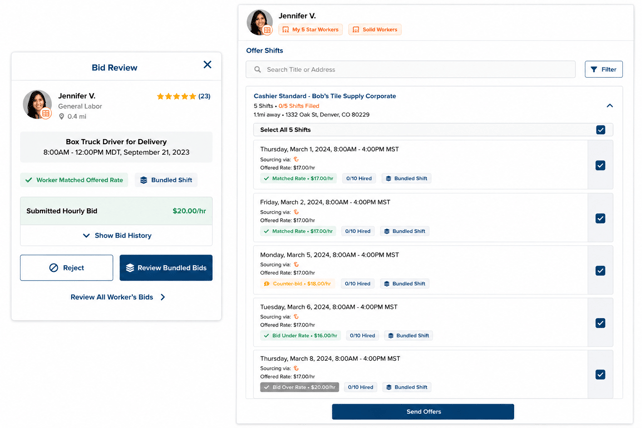
When a Worker bids on your bundle, open their bid and select "Review Bundled Bids" to see every Shift in the bundle they're available for. From there, you decide whether to send them one offer, a few, or the whole bundle at once.
Heads up: Starting 12 hours before each Shift's start time, Smart Hire also starts sending individual offers for any Shifts still open — so a Worker might see your Shift as part of a bundle offer and as a standalone offer at the same time. That's Smart Hire making sure every Shift gets covered, even if the bundle itself doesn't fill.