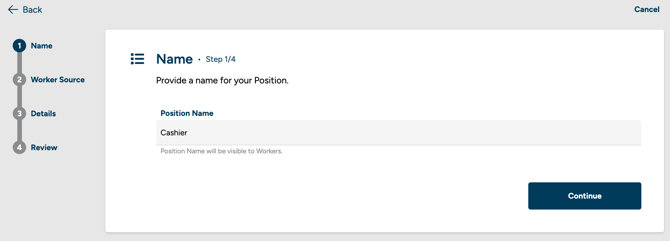
Step 1 - Start creating a new position. You'll see three steps: Name, worker Source, and Details.
Step 2 - Enter a name for the position.
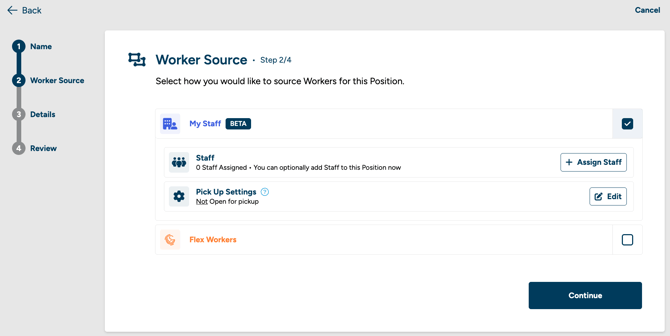
Step 3 - On the worker Source step, select Staff workers as the source. If your organization only has the Staff product, this will be the only option shown.
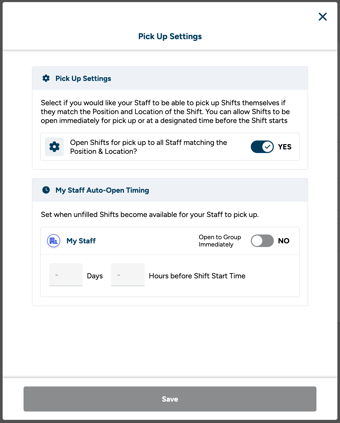
Step 4 - Optionally customize the Staff source in two ways. First, you can assign specific staff workers to the position — this controls who can see and pick up shifts for this role. Second, you can set Pick Up Settings, which determine when a shift becomes available for staff to pick up: not open for pick up, open immediately, or open at a specific time before the shift starts.
Step 5 - On the Details step, fill in the position details. The Responsibilities section is optional for staff-only positions.
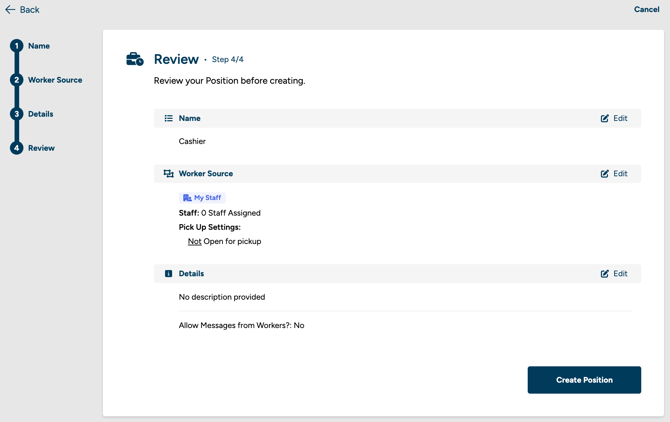
Step 6 - Review your position on the Review step. You can edit any previous step from here. Staff positions don’t require pay rate, add-ons, or CPQ — those only apply to positions with a G-Flex worker source.
For staff to pick up a shift, they must be assigned to both the position and the location where the shift is posted.