
If a Business has added tasks to your Shift, you'll see a heads-up on your Shift card as soon as you're scheduled, and you'll be able to open and work on them once your Shift goes active. No extra app or login needed. Task completion is just for tracking. It never blocks you from reviewing, submitting, or approving your timesheet.
Finding your tasks
Look for the Shift Tasks card on your Shift. It shows how many tasks you have. Once your Shift is active, tap "Open Tasks" to see the full list, split into two tabs:
- My Tasks: tasks assigned specifically to you
- Shared Tasks: open to anyone scheduled on the Shift
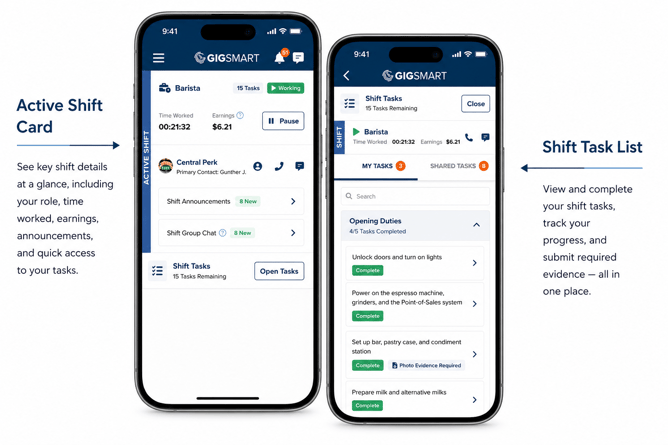
Tasks are grouped by list (like "Opening Duties" or "Mid-Shift Duties"), each with its own completion count.
Completing a task
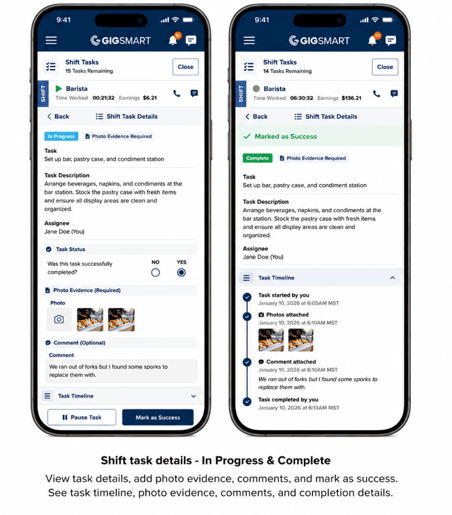
Tap a task, then "Start Task." When you're done, answer "Was this task successfully completed?". Yes marks it Complete, No marks it Not Complete. If the task requires a photo, you'll attach it right here before marking it complete (a comment is always optional, either way). You can pause a task and pick it back up later without losing your progress.
Once you mark a task Complete or Not Complete, that answer, along with any photo or comment, is locked in and can't be edited afterward, so double-check before you submit.
Claiming a shared task
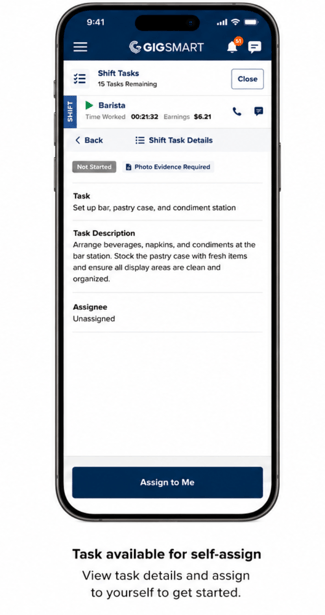
Shared tasks are first-come, first-served. Tap "Assign to Me" to claim one before you start it. If someone beat you to it, you'll see their name on the task and can pick a different one.
Changed your mind? You can unassign yourself from a shared task any time before you tap Start Task. Once you've started it, though, it's yours to finish
After your Shift ends
You've got up to 6 hours after your clock ends to finish up anything still In Progress or Paused, and Not Started as long as it's assigned to you. You just can't pick any Shared Tasks once the clock has eneded. After that window closes (or once the Shift is fully wrapped up), any task that's still Not Started, In Progress, or Paused gets automatically marked Not Complete, and your task list becomes read-only. You can always look back at it from Timesheet Review, photos, comments, and full timeline included.
Shift Tasks work exactly the same whether you're a 1099, W-2, or Workplace Worker, and they show up separately from any Onfleet delivery tasks on the same Shift.