
A Bundled Shift is a group of 2-7 Shifts from the same Business, same Position, and same Location, posted together as one opportunity. Instead of applying one day at a time, you bid on the whole bundle, and if you're hired, you're set for every Shift in it.
How to spot a bundle:
- Look for "Bundles Available" on a Shift listing in Browse
- Look for the "Bundled Shift" tag on Shifts in My Gigs
- Tap the layered-shifts icon or the "?" next to either one to see exactly which Shifts are included
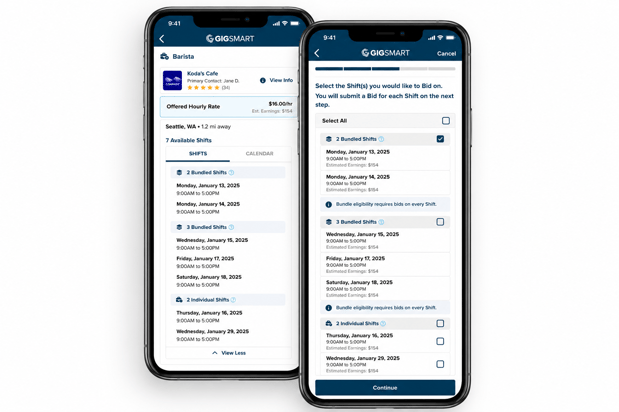
How bidding works:
Bundled Shifts are all-or-nothing — you can't pick and choose individual days within a bundle. When you're ready to apply, you'll submit a bid for every Shift in the bundle at once. You can use the same bid for every Shift, or customize your bid per Shift if the lengths vary.
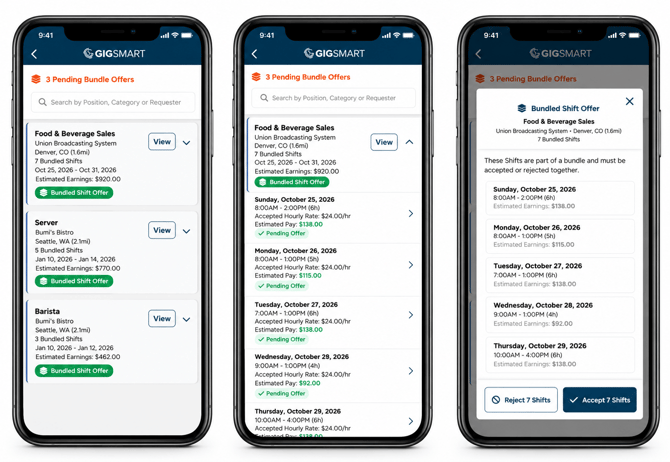
Accepting an offer:
Pending Bundle Offers show up together at the top of your Home tab. Open the offer to see every date, time, and estimated pay for the whole bundle, then Accept or Reject it as one unit. Accepting confirms you for every Shift listed.
If you reject a bundle offer, any individual offer you're holding for those same Shifts gets rejected too, since they're tied together.
A couple of things to know:
- Within 12 hours of a Shift's start time, that specific Shift may also come to you as an individual offer if a spot's still open — even if it's part of a bundle you already bid on or were offered.
Bundled Shifts are a good way to build a more predictable week — same team, same site, multiple days locked in with one bid.